How Many Screws per Sheet of Drywall
Choose the sheet size, wall or ceiling and framing spacing to get screws per sheet, then enter your sheet count for the total with a spare allowance.
Recent
Your last 10 settings, saved only in this browser. Nothing is uploaded.
This free calculator estimates how many screws per sheet of drywall you need for a wall or ceiling. You enter the sheet size, wall or ceiling, framing spacing, sheet direction and number of sheets, and it shows the screws per sheet along with a total that includes a spare allowance.
It runs in your browser, nothing is uploaded, and no sign-up is needed. Also searched as screws in drywall spacing, the page sets two named spacing rules side by side so you can see where they differ. Results are calculated from your inputs, so treat them as estimates. The adopted code and the board maker’s instructions govern your job.
How to use the Screws per Sheet of Drywall Calculator
- Choose the “Sheet size (ft)”: 4 × 6, 4 × 8, 4 × 10 or 4 × 12.
- Under “Where it goes”, choose Wall or Ceiling.
- Choose the “Framing spacing (in, on center)”: 16 or 24 in.
- Set “Long edge runs” to Across the framing or Along the framing. The page notes that across is the usual way sheets are hung, and that both are counted the same way.
- Enter the “Number of sheets” you plan to hang.
- Choose a “Spacing rule”: the residential code table (IRC R702.3.5), ASTM C840 as quoted by a city, or “My own spacing”, where you type your own edge and field spacing. If you type spacing wider than 16 in, the tool shows a warning, because no source used allows more.
- Set “Extra screws (%)”, the allowance for dropped and stripped screws. It starts at 5 %, and you can change it.
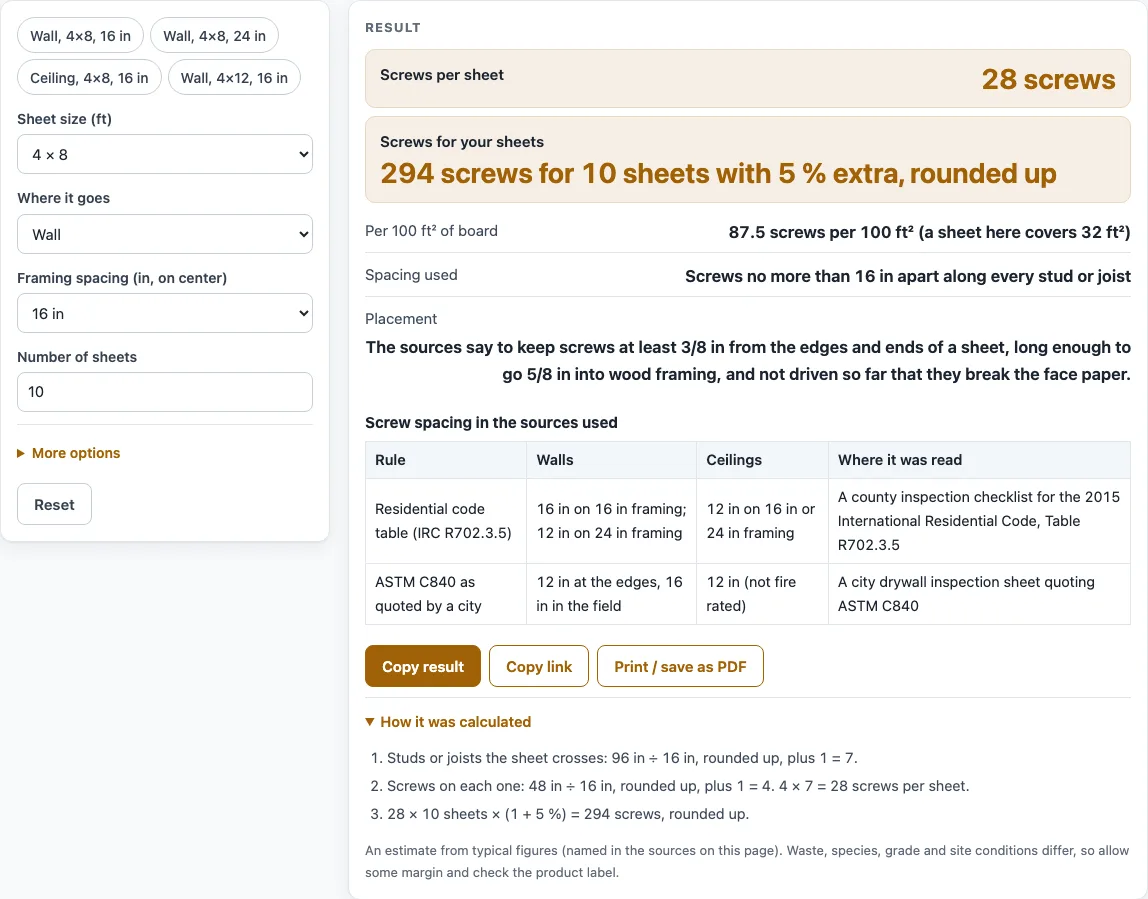
- Read the results: “Screws per sheet”, “Screws for your sheets” (with the allowance, rounded up to whole screws), “Per 100 ft² of board”, the spacing used and the placement note. The four presets (wall 16 in, wall 24 in, ceiling 16 in and a 4 × 12 wall) fill the form in one click.
The default settings (4x8 wall, 16 in framing, 10 sheets, residential code table, 5 % extra) give a starting point. Change one input at a time to see how sheet direction, framing spacing or the spacing rule affects the count.
How many screws per sheet of drywall do the two spacing sources call for?
The residential code table and the ASTM C840 rule give different spacing for walls, so the tool shows both rather than blending them. Under the residential code table (2015 IRC Table R702.3.5, read on a county checklist), screws go every 16 in on walls with 16 in framing, every 12 in on walls with 24 in framing, and every 12 in on ceilings with 16 or 24 in framing. Under the C840 rule, quoted by a city inspection sheet, walls get screws every 12 in at the edges and every 16 in in the field, and ceilings get screws every 12 in. The C840 ceiling rule applies to assemblies that are not fire rated.
For a 4x8 wall on 16 in framing using the code table, the tool gives 28 screws per sheet. A 4x8 wall on 24 in framing gives 25 screws if the sheet is hung across the studs and 27 if it is hung along them. A 4x8 ceiling on 16 in joists gives 35 across and 36 along. A 4x12 wall using the C840 rule gives 42 screws per sheet. These figures are calculated by the tool from the named rules, and your own job may differ.
How does the calculator count screws on one sheet?
The calculator counts each sheet alone. It places a framing line under both sheet edges and at every spacing step across the sheet. The number of lines equals the sheet width across the framing divided by the framing spacing, rounded up, plus 1. Each line holds the sheet length along it divided by the screw spacing, rounded up, plus 1 screws. The two edge lines use the edge spacing and the inner lines use the field spacing, and adding them up gives the screws per sheet.
The total is the screws per sheet multiplied by the number of sheets, plus the spare allowance. The result is rounded up to whole screws, and the spare allowance (5 % to start, set by you) is applied to the total only. For example, 280 screws for 10 sheets with 5 % extra gives 294 screws (280 × 1.05). Twenty 4x12 sheets on the C840 rule give 42 screws per sheet and 882 screws with 5 % extra.
Placement matters as much as the count. The sources say to keep screws at least 3/8 in from sheet edges and ends, long enough to penetrate 5/8 in into wood framing, and not driven so hard that they break the face paper. Fire-rated assemblies, two-layer walls and adhesive follow their own listings. The tool does not give screws per box or per pound, because no public count was read for those.
Sources (checked 15 October 2026): mybuildingpermit.com · newportbeachca.gov
Worked examples
| Input | Result |
|---|---|
| 4×8 Wall sheet, 16 in framing | 28 screws per sheet |
| 4×8 Wall sheet, 24 in framing | 25 screws per sheet |
| 4×8 Ceiling sheet, 16 in framing | 35 screws per sheet |
| 4×12 Wall sheet, 16 in framing | 42 screws per sheet |
| 4×8 Wall sheet, 16 in framing | 52 screws per sheet |
Calculated by the tool above; open it with the same values to see each step.
Frequently asked questions
Is the result from this calculator a code requirement for my wall?
No. The result is an estimate calculated from your inputs. Your local adopted code and the board maker’s instructions decide what is required for your job.
Why does the tool show two different spacing rules for walls?
The residential code table and the ASTM C840 rule are different sources, and they do not agree on wall spacing. The tool shows each one separately so you can compare them. It does not mix them into a single rule.
What does the spare allowance do?
The spare allowance adds extra screws to the total for waste or dropped screws. It starts at 5 %, and you can change it. It is applied to the total number of screws, not to each sheet.
Why is the result rounded up?
Screws come in whole numbers, so the calculator rounds each count up to the next whole screw. This keeps the total from falling short of the calculated number.
Can I type my own spacing?
Yes. You can type your own edge and field spacing. If the spacing is wider than 16 in, the tool shows a warning, because no source used allows more than 16 in.
Does this tool tell me how many screws are in a box?
No. Screws per box or per pound are not given, because no public count was read. Use the count on your screw packaging for that.
Related tools
- Wood Screw Size Chart: Use it when you need to compare wood screw sizes by gauge.
- Nail Size Chart: Use it when you are comparing nail sizes to screws for the same job.
- Lag Screw Pilot Hole Size Chart: Use it when your project needs heavier fasteners than drywall screws.
- Metric Bolt Size Chart: Use it when you need to look up metric bolt sizes for a fixing job.
- Nails, Screws and Bolts: The full set of fastener tools on this site.
- Stud Spacing: Use it when you are checking stud spacing for a wall.
- Plywood Sizes: Use it when you need standard panel sizes.