Plywood Thickness Chart
Choose the thickness on the panel label to see the decimal inches, the millimeters and the tolerance band, with the real stamped thickness one maker prints.
Recent
Your last 10 settings, saved only in this browser. Nothing is uploaded.
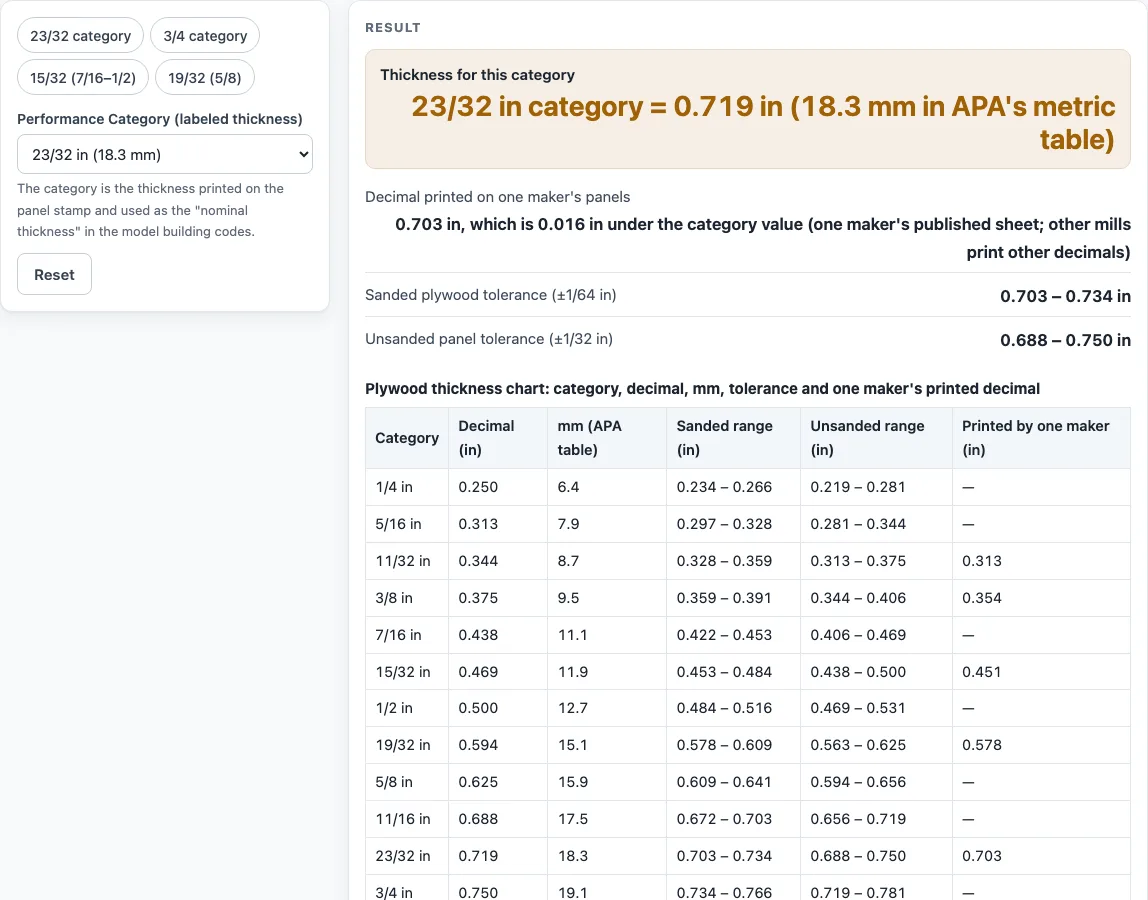
How to use the plywood thickness tool
- Find the Performance Category on the panel label. It is the fraction or number printed with the thickness, such as 23/32 or 3/4.
- Choose that category in the “Performance Category (labeled thickness)” control. If it fits one of the presets, you can pick the preset instead: “23/32 category”, “3/4 category”, “15/32 (7/16–1/2)” or “19/32 (5/8)”.
- Read the output for the category. The first row, “Thickness for this category”, gives the decimal inch value and the millimeter value.
- Check “Sanded plywood tolerance (±1/64 in)” and “Unsanded panel tolerance (±1/32 in)”. For 23/32, the sanded band is 0.703 to 0.734 in, and the unsanded band is 0.688 to 0.750 in.
- Look at “Decimal printed on one maker’s panels”. If the sources used here do not include one, the output says “none in the sources used here.”
- Review the steps to see how the numbers were reached. For example, 23/32 becomes 0.719 in, and 0.719 x 25.4 is about 18.3 mm, which matches the 18.3 mm in APA’s table.
- Compare your panel’s stamp with the label. If they do not match, trust the stamp and the mill’s own specification over this table.
Every value is calculated from the category you choose, so changing the category updates all rows at once. The chart table below the output lists every category in the same columns, so you can also read neighboring categories without changing the control.
What is the true thickness of plywood?
The true thickness of plywood is the measured size of the panel, which is often a little different from the fraction on its name. Since 2008, panels carry a Performance Category and a decimal thickness, and APA says the decimal is generally at or near the lower tolerance. That means a panel is usually a little under its label.
To turn a fraction into a decimal, divide the top number by the bottom number. For example, 3/4 is 0.750 in, 19/32 is 0.594 in, 15/32 is 0.469 in, and 23/32 is 0.719 in. Millimeters come from multiplying the decimal inch value by 25.4. A 3/4 panel is 19.1 mm in APA’s metric table, and a 1/2 panel is 12.7 mm.
Tolerance is the allowed range around the category value. APA gives a tolerance of plus or minus 1/64 in on sanded plywood and plus or minus 1/32 in on unsanded panels. For 23/32, that gives 0.703 to 0.734 in for sanded panels and 0.688 to 0.750 in for unsanded panels. APA’s construction guide and its technical topic page do not describe the minus 1/32 in limit the same way: the topic page says NIST rules do not permit the minus 1/32 in tolerance on labeled nominal thickness. This page shows both bands so you can see the difference, and sizes vary by mill.
How does a plywood thickness chart work?
A plywood thickness chart lists each Performance Category with its decimal inch value, its millimeter value, and its tolerance. The chart is a lookup table: you find the category on your label, then read across to the size. This tool does the same lookup and also runs the conversion steps so you can check them.
The printed decimal is the value one maker writes on its own spec sheet. In the sources used here, one maker prints 0.703 in for 23/32, which is 0.016 in under the 0.719 in category value. Other mills print other decimals, and some retail listings for 23/32 show 0.688 in. Those are not errors in the tool: the sources differ, so the page shows one maker’s sheet and says other mills may differ.
The 3/4 and 23/32 categories both appear in APA’s tables, at 0.750 in and 0.719 in. Many stores list 23/32 panels next to 3/4 panels, so the table shows both rows. That lets you compare a 3/4 panel’s true thickness with a 23/32 panel without guessing which is thicker.
Sources (checked 15 October 2026): swansongroup.biz · design.medeek.com · apawood.org · images.homedepot-static.com · apawood.org
Worked examples
| Input | Result |
|---|---|
| 23/32 in category | 0.719 in = 18.3 mm |
| 3/4 in category | 0.750 in = 19.1 mm |
| 1/2 in category | 0.500 in = 12.7 mm |
| 19/32 in category | 0.594 in = 15.1 mm |
Calculated by the tool above; open it with the same values to see each step.
Frequently asked questions
Is 3/4 plywood really 3/4 inch thick?
APA’s table gives 0.750 in for the 3/4 category, but a panel is usually a little under its label because the decimal is generally at or near the lower tolerance. Check the decimal on your own panel’s stamp to see its actual size.
Why is my 23/32 panel thinner than 0.719 in?
Panels are usually a little under their label, because the decimal is generally at or near the lower tolerance. For 23/32, the sanded band is 0.703 to 0.734 in. One maker’s sheet prints 0.703 in for 23/32.
What does the Performance Category mean?
The Performance Category is the code printed on the panel label that identifies its thickness category, such as 23/32 or 3/4. Since 2008, panels also carry a decimal thickness next to it.
Why do different listings show different decimals for the same category?
Sources differ, and other mills print other decimals. Some retail listings show 0.688 in for 23/32, while one maker’s sheet shows 0.703 in. The tool shows one maker’s values and says that sizes vary by mill.
Does a result from this tool mean a panel meets a building requirement?
No. The tool shows typical sizes from the named sources and calculates results from the category you enter. It does not check any panel against a building requirement, so use your project’s specifications and the panel’s own stamp for that.
How are the millimeter values worked out?
The tool divides the fraction into a decimal, then multiplies by 25.4. For 23/32, 0.719 x 25.4 is about 18.3 mm, and APA’s metric table lists 18.3 mm, which is the value shown.
Related tools
- Plywood Sizes: Use it to compare full panel sizes when you already know the thickness you need.
- Lumber Dimensions: Use it when you are checking the actual size of boards alongside plywood.
- 2x4 Dimensions: Use it to look up the actual size of a common 2x4 stud.
- Stud Spacing: Use it when you are planning the layout of studs for a wall project.
- Board Foot Calculator: Use it to estimate board feet for a lumber list.
- Roof Plywood Thickness: Use it when the panel thickness is for roof sheathing.
- Floor Joist Spacing: Use it to see joist layout marks for subfloor panels.