Lumber Dimensions
Choose a nominal size such as 2x6 to see its actual dimensions in inches and mm, dry or green, with its area, section modulus and moment of inertia.
Recent
Your last 10 settings, saved only in this browser. Nothing is uploaded.
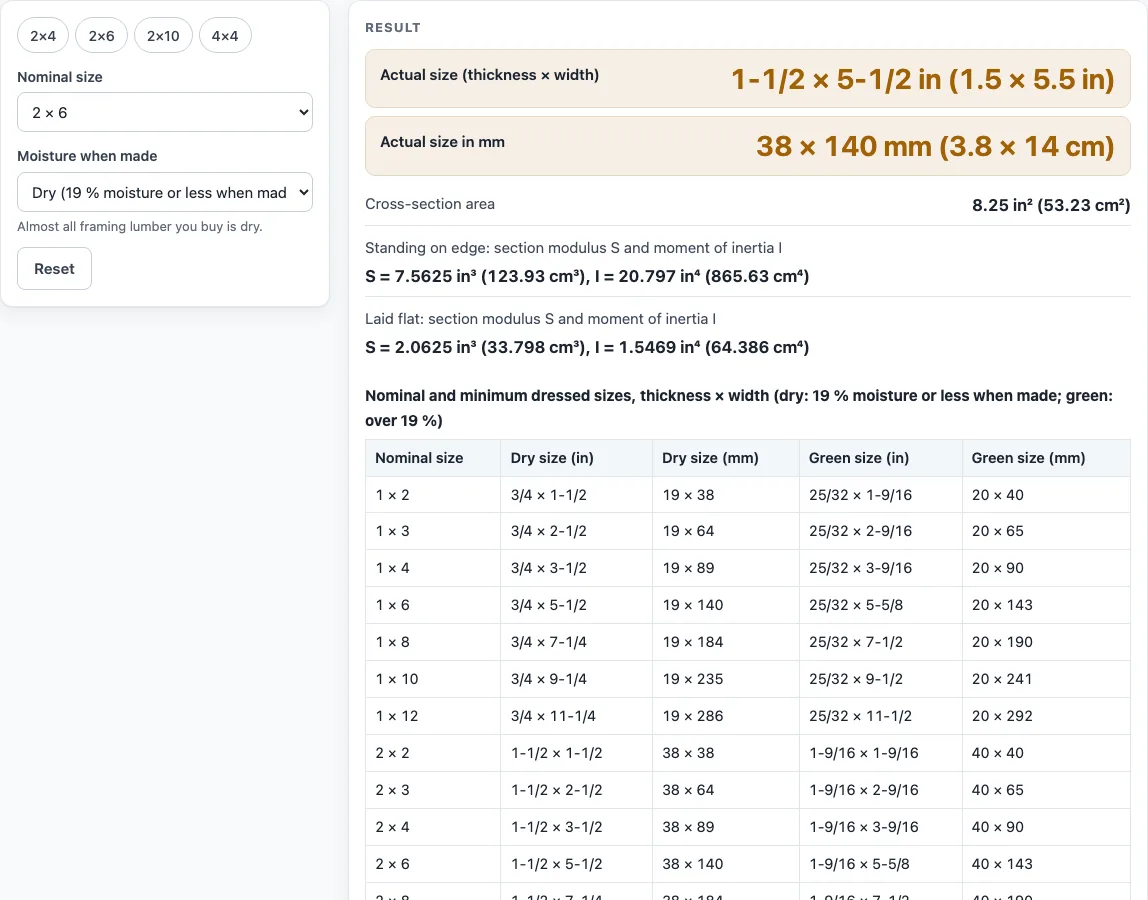
How to use the Lumber Dimensions tool
- Open the tool at the top of this page. It starts on a 2x6 dry, shown as 1-1/2 x 5-1/2 in (38 x 140 mm).
- Choose dry or green. Dry means the lumber was made at 19 % moisture or less. Green means the lumber was over 19 % moisture when it was made.
- Pick your nominal size from the 23 available options: 1x2 to 1x12, 2x2 to 2x12, 4x4 to 4x12, 6x6, 6x8, 8x8 and 10x10.
- Read the actual size in fractions and decimals of an inch, and in mm and cm.
- Read the cross-section area A, then the “Standing on edge” line with the section modulus S and moment of inertia I. S is shown in in³ (and cm³), and I in in⁴ (and cm⁴).
- If the board will lie flat rather than stand on edge, read the “Laid flat” line instead.
- Compare your result with the chart table further down the page, which lists all 23 nominal sizes with dry and green dressed sizes.
- Measure the board you actually buy before you plan a cut, because the dressed size can differ from the table.
The tool gives you a quick reference for each size. The chart table is useful when you want to see several sizes side by side.
What are nominal lumber sizes and dimensions?
Nominal lumber sizes, also called nominal lumber dimensions, are the names used for a piece of wood, such as 2x6, and they are not its finished size. Once dressed to the sizes in PS 20-10 Table 3, a nominal 2x6 is smaller than its name suggests. The tool shows this smaller size, which is the actual or minimum dressed size. As the southern pine grading agency explains, a 2x4 and a 2x6 are 1/2 in narrower than nominal, while a 2x8 to a 2x12 are 3/4 in narrower.
The standard sets different rules by size. A 1-inch board is 3/4 in thick when dry and 25/32 in when green. Dimension lumber of 2 in is 1-1/2 in dry and 1-9/16 in green, and 4 in is 3-1/2 in dry and 3-9/16 in green. Timbers that are 5 in and thicker are reduced further, by 1/2 in for 5 to 6 in and by 3/4 in dry for 7 to 15 in. A 6x6 is 5-1/2 x 5-1/2 in, and an 8x8 is 7-1/4 in dry or 7-1/2 in green.
Trade pages often call the dry dressed size “the actual size.” The standard calls these minimum dressed sizes. For dry sizes the two agree. The chart table below the tool lists every size with its dry and green dressed size in inches and millimeters, and millimeters follow the standard’s own rounding of 25.4 times the inch size.
How are the section properties of lumber dimensions calculated?
The tool calculates section properties from the actual rectangle, not the nominal name. Let b be the thickness and d be the width of the dressed piece. The area is A = b × d. When the board stands on edge, the section modulus is S = b × d² / 6, and the moment of inertia is I = b × d³ / 12. When the board lies flat, the two sides swap roles.
Take a dry 2x6, which is 1.5 × 5.5 in. Its area is 8.25 in², and standing on edge its S is 7.5625 in³ (123.9 cm³) and its I is 20.797 in⁴ (865.6 cm⁴). Laid flat, its S drops to 2.0625 in³. The difference shows why orientation matters. The same piece has much larger S and I on edge than flat, because the depth enters the formula squared or cubed. The tool shows both lines so you can see the difference for any size.
These values describe geometry only. They are not a span, load or safety check.
Sources (checked 15 October 2026): nist.gov · blog.spib.org · capitolcitylumber.com · blog.spib.org
Worked examples
| Input | Result |
|---|---|
| Nominal 2 × 6, Dry (19 % moisture or less when made) | 1-1/2 × 5-1/2 in, S = 7.5625 in³, I = 20.797 in⁴ |
| Nominal 2 × 4, Dry (19 % moisture or less when made) | 1-1/2 × 3-1/2 in, S = 3.0625 in³, I = 5.3594 in⁴ |
| Nominal 2 × 10, Dry (19 % moisture or less when made) | 1-1/2 × 9-1/4 in, S = 21.391 in³, I = 98.932 in⁴ |
| Nominal 2 × 6, Green (over 19 % moisture when made) | 1-9/16 × 5-5/8 in, S = 8.2397 in³, I = 23.174 in⁴ |
| Nominal 6 × 6, Dry (19 % moisture or less when made) | 5-1/2 × 5-1/2 in, S = 27.729 in³, I = 76.255 in⁴ |
Calculated by the tool above; open it with the same values to see each step.
Frequently asked questions
Are the sizes the same for every lumber mill?
No. The numbers are minimums at the time of manufacture, and they change with moisture. Mills and regions vary, so the board you buy may differ slightly from the table. Measure your lumber before you plan a project.
What is the difference between dry and green?
Dry lumber was made at 19 % moisture or less. Green lumber is wetter and is slightly thicker or wider in the same nominal size. For example, a 2-inch dimension board is 1-1/2 in dry and 1-9/16 in green.
How long is dimension lumber?
The grading rules set standard lengths in multiples of 1 ft or 2 ft (PS 20-10 s.5.3.1). Dimension lumber is made from 6 to 24 ft. One yard lists 2x4 in 8, 10, 12 and 16 ft.
Do the S and I values show whether a beam is safe?
No. S and I are shown as geometry only. They are not a span, load or safety check. For beams, joists or any structural use, talk to an engineer or check the building code that applies where you build.
Why are the metric sizes rounded?
Millimeters are 25.4 times the dressed inch size, rounded as PS 20-10 Appendix B1 describes. So the mm figure may look slightly off from a simple conversion of a fraction.
Which sizes does the tool cover?
It covers 23 sizes: 1x2 to 1x12, 2x2 to 2x12, 4x4 to 4x12, 6x6, 6x8, 8x8 and 10x10. The sizes come from PS 20-10 Table 3.
Related tools
- 2x4 Dimensions: Use this when you only need the actual size and section values for a 2x4.
- Board Foot Calculator: Use this to estimate the volume of boards for a purchase.
- Floor Joist Spacing: Use this to look at how joists are spaced across a floor.
- Lumber Weight Calculator: Use this to estimate how heavy a piece of lumber is.
- Plywood Sizes: Use this to compare standard plywood panel sizes with lumber.
- Plywood Thickness Chart: Use this to look up common plywood thicknesses.
- Stud Spacing Calculator: Use this to work out how far apart studs should be placed.